> For the complete documentation index, see [llms.txt](https://help.craftsmanplus.com/llms.txt). Markdown versions of documentation pages are available by appending `.md` to page URLs; this page is available as [Markdown](https://help.craftsmanplus.com/play/general/actions/call-number.md).
# Call Number
Open the device dialer with a phone number pre-filled when an action is triggered.
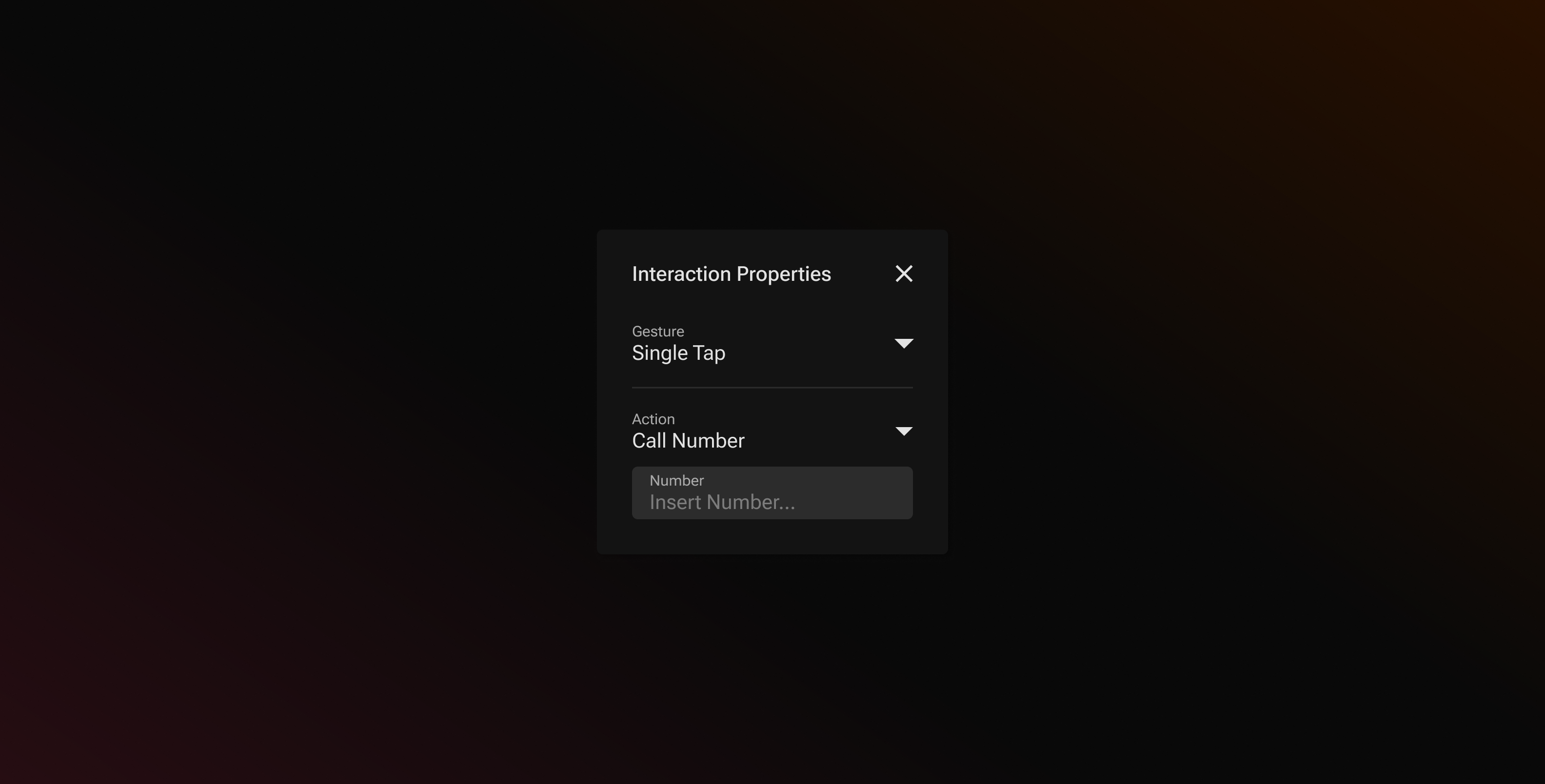
The **Call Number** action lets a playable start a phone call. When triggered, the device dialer opens with your number pre-filled — the user just presses call.
This is useful for patterns like:
* Click-to-call lead generation ads
* Local service and dealership campaigns
* Any CTA where a phone call converts better than a landing page
### How it Works
When you select **Call Number** as an action, PLAY shows a single **Number** field.
Enter the phone number you want dialed. The field accepts digits and an optional leading `+` — nothing else. Spaces and formatting characters in pasted numbers (such as `(`, `)`, `-`, `.`) are removed automatically, and dialer control characters (`*`, `#`, `,`, `;`) are never accepted.
{% hint style="info" %}
Enter the number in full international format (for example `+15551234567`). The leading `+` tells the device how to dial the number from any country. Without it, the number is dialed as a local number in the **user's** country, which may fail for users outside your market.
{% endhint %}
### Where You Can Use It
**Call Number** is available anywhere **Launch URL** is available, at the bottom of the action dropdown beneath **Fire Tracker**.
Like [**Launch URL**](/play/general/actions/launch-url.md), it should be triggered by a **Single Tap** — devices can block dialer navigation from other gestures, and PLAY will show a compliance suggestion if the action is wired to anything else.
### Setting Up Call Number
{% stepper %}
{% step %}
### Open any action dropdown menu.
{% endstep %}
{% step %}
### Select **Call Number.**
{% endstep %}
{% step %}
### In the **Number field,** enter the phone number in international format.
{% endstep %}
{% step %}
### Save your setup as usual.
{% endstep %}
{% endstepper %}
{% hint style="warning" %}
Devices without a dialer (desktop browsers, most tablets) show a system prompt or do nothing. In the PLAY editor preview, triggering the action shows a **Call Triggered** dialog with the number instead of opening the dialer.
{% endhint %}
{% hint style="warning" %}
Many ad networks control the click-out themselves and ignore the destination in the playable. On those networks, Call Number sends users to the store or campaign click-through instead of the dialer. Call Number also does not count as a CTA for the [Project Score](/play/export/project-score.md) CTA checks, so pair it with a [Launch URL](/play/general/actions/launch-url.md) or [Launch App Store](broken://pages/BceD3nnJOe4CewmqequV) elsewhere in the project.
{% endhint %}
---
# Agent Instructions
This documentation is published with GitBook. GitBook is the documentation platform designed so that both humans and AI agents can read, navigate, and reason over technical content effectively. Learn more at gitbook.com.
## Querying This Documentation
If you need additional information that is not directly available in this page, you can query the documentation by asking a question.
Perform an HTTP GET request on the following URL with the `ask` and `goal` query parameters:
```
GET https://help.craftsmanplus.com/play/general/actions/call-number.md?ask=&goal=
```
`ask` is the immediate question: it should be specific, self-contained, and written in natural language.
`goal` is what the user is ultimately trying to achieve, the reason they need the answer. Sharing it helps GitBook give you a better, more relevant answer. A goal is most helpful when it describes the outcome the user wants rather than restating the question. For example, with `ask=how do I create an API token`, a goal like `automate deployments from our CI pipeline` lets GitBook tailor the answer to that use case.
The response will contain a direct answer to the question and relevant excerpts and sources from the documentation.
Use this mechanism when the answer is not explicitly present in the current page, you need clarification or additional context, or you want to retrieve related documentation sections.