> For the complete documentation index, see [llms.txt](https://help.craftsmanplus.com/llms.txt). Markdown versions of documentation pages are available by appending `.md` to page URLs; this page is available as [Markdown](https://help.craftsmanplus.com/play/catalogue/what-is-catalogue.md).
# What is Catalogue?
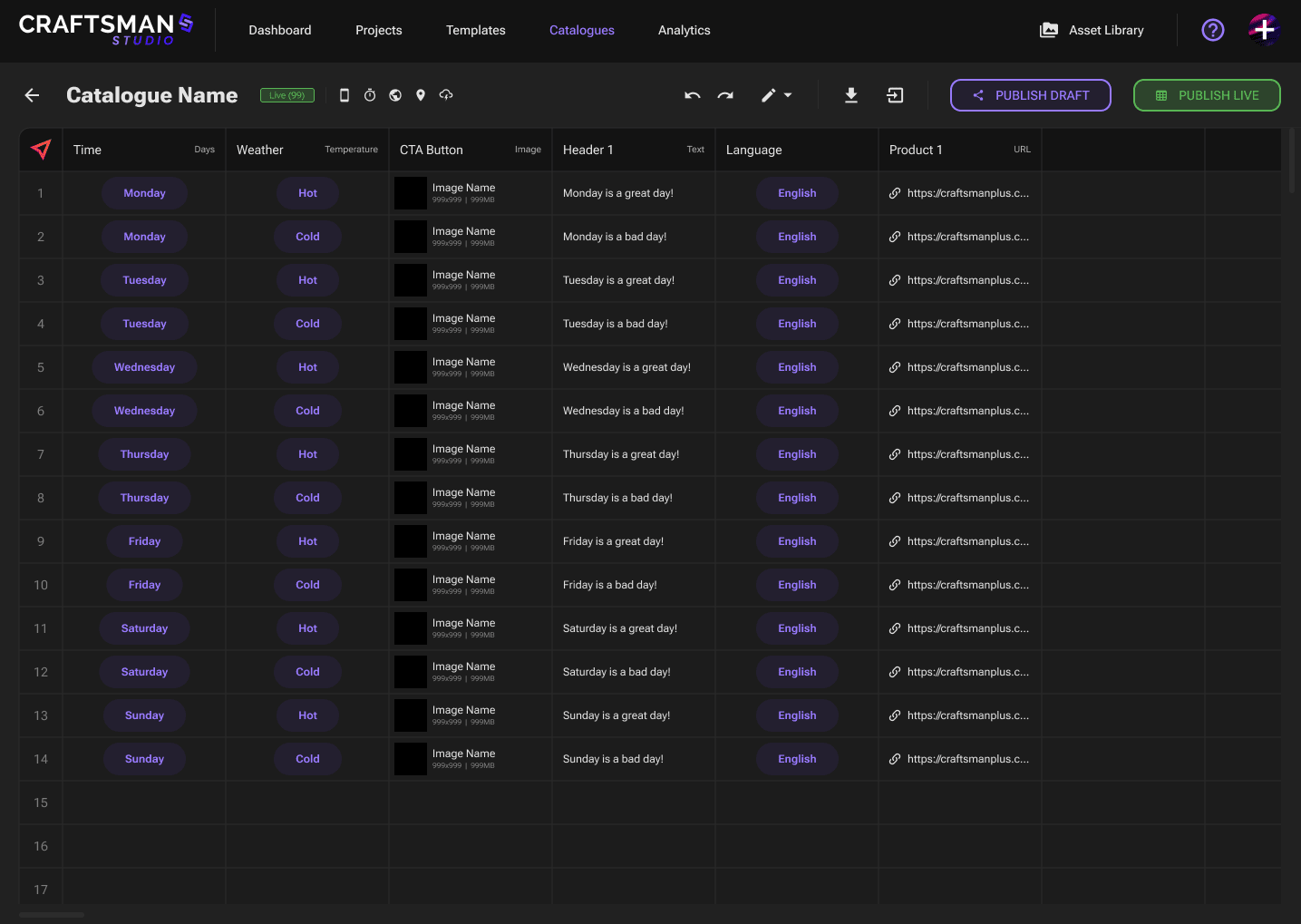
**Catalogue** is a structured data system (like a spreadsheet) that separates *content* (assets, text, links) from *creative logic* inside CRAFTSMAN STUDIO.\
It enables dynamic content at scale, configuring creatives to have thousands of asset combination which would normally be limited by a 5mb file size.
**This is not a replacement to the Dynamic Content system already within PLAY, it's an addition which expands the capabilities of loading dynamic content into creatives.**
In simple terms, Catalogue lets you:
* Define what assets and text should appear under specific conditions (e.g., language, time, location, weather, or device).
* Configure any image/text/url that can be dynamically “replaced” via the catalogue when the creative loads
* Editing + previewing the dynamic layers while building
* Advanced publishing system which enables version control and updating exported creatives without have to re-export
The result is a content delivery system that enables dynamic creatives at scale, allowing you to create diverse creatives that contextualize the target user and drive increased performance.
### **Why it Exists**
Before Catalogue, you had to rely on the **Dynamic Content** system which is manually-built into creatives.
That meant:
* Only a small number of dynamic conditions could be used (MAX 2).
* Every variant required new assets to be stored inside the creative, and you would run into the 5MB file size cap.
* Updating or expanding variants required a **re-export and redeploy**.
Catalogue enables you to build these dynamic content system within a separate editor in Studio. Projects connect to the catalogue at runtime and load the correct set of assets via an API call.
Now you can setup dynamic creatives that have thousands of potential variants while only having the file size impact of a single set of assets.
---
# Agent Instructions
This documentation is published with GitBook. GitBook is the documentation platform designed so that both humans and AI agents can read, navigate, and reason over technical content effectively. Learn more at gitbook.com.
## Querying This Documentation
If you need additional information that is not directly available in this page, you can query the documentation by asking a question.
Perform an HTTP GET request on the following URL with the `ask` and `goal` query parameters:
```
GET https://help.craftsmanplus.com/play/catalogue/what-is-catalogue.md?ask=&goal=
```
`ask` is the immediate question: it should be specific, self-contained, and written in natural language.
`goal` is what the user is ultimately trying to achieve, the reason they need the answer. Sharing it helps GitBook give you a better, more relevant answer. A goal is most helpful when it describes the outcome the user wants rather than restating the question. For example, with `ask=how do I create an API token`, a goal like `automate deployments from our CI pipeline` lets GitBook tailor the answer to that use case.
The response will contain a direct answer to the question and relevant excerpts and sources from the documentation.
Use this mechanism when the answer is not explicitly present in the current page, you need clarification or additional context, or you want to retrieve related documentation sections.